
Omniscope custom block · Outputs
Alerts computed in the workflow, posted to the team's Slack channel as they happen: one message per record, with links that work.
Python · requests, pandas · requests installed on first run if missing
The problem it solves
The workflow already knows which warehouses are below their reorder level each morning; the warehouse leads find out when someone reads the Report. A message in their Slack channel, one per warehouse with a link to the details, reaches them first.
This block posts each record's message to a channel as your Slack app's bot, turning the addresses in it into links.
- 6 warehouses in the invented sample, 5 messages posted (Glasgow has nothing below its reorder level, so its message is empty and skipped)
- 1 request per message (
chat.postMessage), or 3 with a file attached - 1 clear stop if Slack refuses: the record, Slack's error and what to check, and how many were posted before it
How it works
- Each record's message is put in Slack's text format:
&,<and>escaped, and web addresses made into links that end at the first space. - Messages are posted in input order with the bot token, to the channel ID given.
- With a file chosen, each message is posted with the file attached, through Slack's external upload.
What goes in
Stock alerts
| Warehouse | Lines below reorder level | Message |
|---|---|---|
| Leeds | 12 | Leeds: 12 lines below reorder level. Details: http://127.0.0.1:24679/Operations/Stock.iox/r/Report/#Leeds |
| Bristol | 3 | Bristol: 3 lines below reorder level. Details: .../#Bristol |
| Glasgow | 0 | |
| Norwich | 7 | Norwich: 7 lines below reorder level (garden & outdoor < 5 days' cover). Details: .../#Norwich |
6 rows in the sample file.
The options
| Option | Demo setting | What it does |
|---|---|---|
| Bot User OAuth token | (an example token) | The app's bot token, xoxb-.... |
| Channel ID | C0123ABCD (an example) |
The channel to post to. |
| Message field | Message |
Each record's message. |
| File to attach | (empty) | Optional: a file attached to every message. |
| Attachment title | My Report | The title shown for the file. |
What comes out
Sent
| Row | Action | Channel | Timestamp | File ID |
|---|---|---|---|---|
| 0 | postMessage | C0123ABCD | 1741331101.004519 | |
| 1 | postMessage | C0123ABCD | 1741331101.825639 | |
| 2 | skip | |||
| 3 | postMessage | C0123ABCD | 1741331102.613209 | |
| 4 | postMessage | C0123ABCD | 1741331103.402871 | |
| 5 | postMessage | C0123ABCD | 1741331104.190455 |
The Messages output holds each message as sent: Norwich's reads (garden & outdoor < 5 days' cover) in Slack's format, and shows in Slack as typed. (Timestamps are invented: they come from Slack.)
Where it pays off
Operations: Exception alerts
A message per warehouse, machine or route that crossed a threshold in the latest data, with a link to the detail.
Sales: Daily numbers
Yesterday's orders and revenue per region, posted to the sales channel before the stand-up.
Data teams: Run reports
A note when a scheduled workflow has finished, with record counts and anything that failed validation.
Customer service: Queue warnings
A message when a queue's waiting time or backlog goes over its target.
Use cases describe typical scenarios and are illustrative; the sample data is invented.
Why do this in Omniscope
- The alert rule is the workflow. The threshold that decides who gets a message is a filter in the same workflow that loads the stock data, so the Slack message and the Report always agree.
- Messages built from fields. A formula field writes each message from the record's values and the Report's address, so changing the wording is a change to one formula, not to the block.
- Every run leaves a record. The Sent output lists what was posted, with Slack's timestamps, so the scheduled morning run can be checked and kept like any other data.
- More of Slack's API is a short edit away. The posting is a small Python function; unlock the block's design to edit it, and add
thread_tsto reply in a thread, or Block Kit blocks for richer layouts.
How it fits into an Omniscope workflow
Database (stock) → Aggregate (per warehouse) → Field Organiser (formula field: the message) → Slack Bot
Try it
- Open the demo project (
demo.ioxon the demo server, or importdemo.iozfrom this folder). It holds the sample alerts, the block with example settings (it needs your own Slack app to post), and a File block withplaceholder.csv: what the block outputs when it posts the sample. - The question: which alerts were posted, and which were skipped?
- Look at the placeholder records: five posted, Glasgow skipped.
- To post for real: set up a Slack app as the README describes, paste its bot token and your channel ID, and run the block.
Running in Omniscope
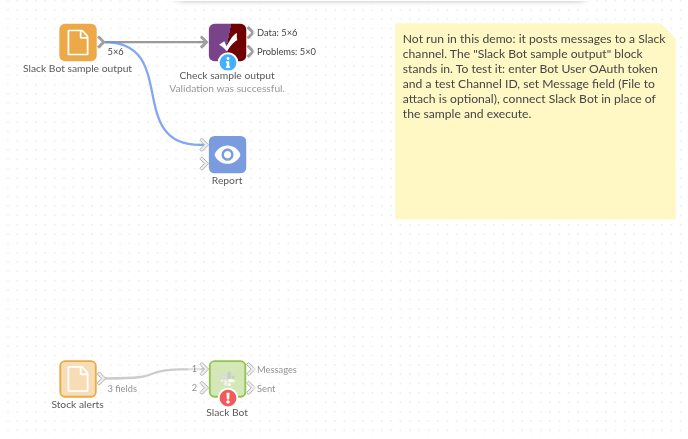
The demo project's workflow: the sample data, the block, and a Validate data check on its output.
Language and libraries
Python. It uses requests (Apache License 2.0) and pandas (BSD 3-Clause).
pandas is part of Omniscope's Python environment. requests is listed in the block's dependencies, so Omniscope installs it with pip on first run if it is missing.
Tested
The block is covered by automated tests that run its script against a stand-in for Omniscope's Python API and a stand-in for Slack's API with canned replies (no live calls): the sample, with every request checked (channel, text, token header); links, escaping and existing Slack markup; integer and date fields with missing values; a file attachment, with the three upload requests checked; a missing file; Slack's refusals (not in channel, bad token, a server error, no network), with the count of messages already posted; missing settings; empty input; and 2,000 messages.