
Omniscope custom block · Connectors
Which channels are busiest, who is in them, what was said? Any Slack Web API method, with every page of the answer turned into records.
Python · requests, pandas · requests installed on first run if missing
The problem it solves
A Slack workspace holds useful operational data: how many channels there are and how big, which are archived or private, who belongs where, how active a support channel is. Slack shows these one channel at a time; the Web API has them all, as JSON in pages of up to a few hundred items, each page pointing to the next with a cursor.
This block makes the call, follows the cursor to the last page, and writes the list as records with nested values flattened into fields.
- 24 invented channels from 2 pages of
conversations.list, combined into one output - 16 fields per channel, including
num_members,is_private,is_archivedandtopic.value - 1,430 channel memberships in all, ready to sum or chart
- 1 call for chat.postMessage, with the posted message as one record
How it works
- Enter a token, the method name and its arguments as JSON (Query Params for GET, JSON Payload for POST).
- The list in the answer (or the one named in Records from) becomes the Records output; an answer with no list becomes one record.
- Slack's errors stop the block with Slack's message, such as
missing_scope (the token needs the channels:read scope).
What goes in
Nothing from the workflow: the block calls Slack. The demo uses an invented conversations.list answer for a small company's workspace, so it runs without a Slack token; sample-data/placeholder.csv holds the Records output for it.
The options
| Option | Demo setting | What it does |
|---|---|---|
| Slack token | (empty) | A bot or user token with the scopes the method needs. |
| API method | conversations.list |
Any Slack Web API method. |
| HTTP method | GET | GET reads (Query Params); POST changes something (JSON Payload). |
| Query Params (GET) | {} |
The method's arguments, such as {"types": "public_channel,private_channel"}. |
| JSON Payload (POST) | (not used) | The arguments for a POST, such as a channel and a message text. |
| Records from | (empty) | The list to use; empty takes the first list in the answer (channels). |
| Follow pages | ticked | Follows Slack's cursor to the last page. |
What comes out
Records (first 6 channels, some fields)
| id | name | is_private | is_archived | num_members | topic.value | purpose.value |
|---|---|---|---|---|---|---|
| C01000EXAMPLE | general | false | false | 212 | Talk about general | |
| C01001EXAMPLE | random | false | false | 198 | About #random | Talk about random |
| C01002EXAMPLE | sales-uk | false | false | 14 | About #sales-uk | Talk about sales uk |
| C01003EXAMPLE | sales-europe | false | false | 11 | Talk about sales europe | |
| C01004EXAMPLE | support | false | false | 37 | About #support | Talk about support |
| C01005EXAMPLE | support-escalations | false | false | 9 | About #support-escalations | Talk about support escalations |
24 records in all, from two pages. #office-leeds is archived with no members; #finance and #hiring are private. previous_names (a list in Slack's answer) is JSON text: ["sales"] for #sales-uk.
Raw response
Two records, one per page, each holding that page's full JSON answer in Text Response.
Where it pays off
Workspace administrators: Channel housekeeping
List every channel with its size, creation time and archive state, and find empty or duplicate channels to tidy up.
Support teams: Channel activity
Load a support channel's messages with conversations.history and count questions per day, or replies per person.
Operations: Notifications from a workflow
Post a summary to a channel with chat.postMessage at the end of a scheduled workflow, after a Validate data block confirms there is something to say.
Internal communications: Membership
With conversations.members and users.list, see who is in which channels, and who has not joined an announcement channel.
Use cases describe typical scenarios and are illustrative; the sample data is invented.
Why do this in Omniscope
- Channel data beside staff data. In one workflow the channel members join the HR or team list, and the Report shows channel coverage by department, which Slack's own admin pages cannot.
- A weekly channel census without copy-paste. Scheduled, the block re-reads every page each run, so channel counts and sizes are rebuilt from Slack, and Validate data can halt the run before a chat.postMessage block posts a summary built on an empty answer.
- Any method, and a script you can change. New Slack methods work by typing their name, and the paging and flattening are plain Python you can edit: change how a message's replies or files are flattened if the default doesn't suit.
How it fits into an Omniscope workflow
Slack API WebClient (conversations.list) → Record Filter (not archived) → Join (owners list) → Report
Use one block per method: one for channels, another for members (conversations.members, with the channel id in Query Params), and join them on the channel id.
Try it
- Open the demo project (
demo.ioxon the demo server, or importdemo.iozfrom this folder). It holds the Slack block, without a token, and a File block withplaceholder.csv, the 24 channels the block writes for the invented answer. - The question: which channels are largest, and which are archived or empty?
- Follow the File block into the rest of the workflow: channels by
num_members, and the archived ones. - To use your own workspace: create a Slack app with the
channels:readscope, enter its token in the block, run it, and connect its Records output where the File block was.
Running in Omniscope
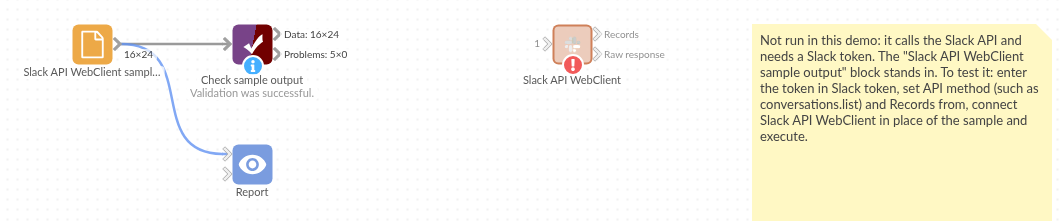
The demo project's workflow: the placeholder data, the block, and a Validate data check on the output.
Language and libraries
Python. It uses requests (Apache License 2.0) and pandas (BSD 3-Clause).
pandas is part of Omniscope's Python environment. requests is listed in the block's dependencies, so Omniscope installs it with pip on first run if it is missing.
Tested
The block is covered by automated tests that run its script against a stand-in for Omniscope's Python API and invented Slack answers (no live calls): two pages combined, the requests sent for GET and POST (address, arguments, cursor, token header), an answer without a list, a chosen list and the first page only, a list of plain values, an empty list, Slack's error answers, bad JSON in the options, a rate-limited call, and 100 pages of 200 channels.