
Omniscope custom block · Preparation
Several values crammed into one cell, one per line? One record per value, with the rest of the record repeated, and several stacked fields kept in step.
Python · pandas, numpy · nothing extra to install
The problem it solves
Order systems, web forms and spreadsheets often export one record per order with the items stacked inside a cell: the products one per line, and their quantities one per line in the next cell. Those cells can't be counted, joined to a product list or charted until each value has a record of its own.
This block splits the chosen fields at the separator and writes one record per value, repeating the order number, customer and date on each.
- 10 orders in, 21 order lines out
- 2 stacked fields kept in step: each product next to its own quantity
- 1 order with a missing quantity: the gap is filled with an empty value, not shifted
- 1 order with no products kept as one record
How it works
- Choose the fields to unstack and the separator:
\n(a line break, the default),\t(a tab) or any text, matched exactly. - Each record becomes as many records as its longest list; shorter lists are filled with empty values.
- The other fields are repeated and keep their types; the unstacked values are text.
What goes in
Stacked orders
10 invented orders from a garden supplies wholesaler, with the products and quantities stacked one per line.
| Order | Customer | Order Date | Products | Quantities |
|---|---|---|---|---|
| SO-2001 | Fernhill Garden Centre | 2025-03-03 | Terracotta pot 30cm Compost 50L Hand trowel |
12 20 6 |
| SO-2002 | Marsh Lane Hardware | 2025-03-03 | Hose reel | 4 |
| SO-2005 | Brookside Allotment Society | 2025-03-05 | Netting 4m Cane bundle |
15 |
| SO-2007 | Willow Bank Landscapes | 2025-03-07 |
10 rows in the sample file.
The options
| Option | Demo setting | What it does |
|---|---|---|
| Fields to unstack | Products, Quantities |
Text fields holding several values each, paired by position. |
| Separator | \n |
The text between values: \n line break, \t tab, \r carriage return, or any text. |
What comes out
Unstacked records (selected orders)
| Order | Customer | Order Date | Products | Quantities |
|---|---|---|---|---|
| SO-2001 | Fernhill Garden Centre | 2025-03-03 | Terracotta pot 30cm | 12 |
| SO-2001 | Fernhill Garden Centre | 2025-03-03 | Compost 50L | 20 |
| SO-2001 | Fernhill Garden Centre | 2025-03-03 | Hand trowel | 6 |
| SO-2002 | Marsh Lane Hardware | 2025-03-03 | Hose reel | 4 |
| SO-2005 | Brookside Allotment Society | 2025-03-05 | Netting 4m | 15 |
| SO-2005 | Brookside Allotment Society | 2025-03-05 | Cane bundle | |
| SO-2007 | Willow Bank Landscapes | 2025-03-07 |
21 records in all. Order SO-2005 lists two products but one quantity, so Cane bundle's quantity is empty rather than taken from the next order.
Where it pays off
Sales operations: Order lines from order exports
Turn one-row-per-order exports into order lines to count units per product, or join to a product list for prices and categories.
Surveys and forms: Multiple-choice answers
Split "tick all that apply" answers stored in one cell into one record per answer, to count how often each option was chosen.
Service desks: Tags and assignees
Unstack tickets with several tags or assignees in one field, to report workload per tag or per person.
Data from spreadsheets: Cells with line breaks
Clean up spreadsheets where several values were typed into one cell with line breaks.
Use cases describe typical scenarios and are illustrative; the sample data is invented.
Why do this in Omniscope
- Order lines ready for the product join. Each new export is unstacked, its quantities turned to numbers in Field Organiser, and joined to the product list, so the per-product counts in the Report follow the latest file.
- Lists stay in step. A missing quantity becomes an empty value rather than shifting the next one up, an order with no products is kept, and the other fields keep their types; the tests cover these cases.
- Any separator. A line break, a tab or any text, matched exactly, is a setting; the splitting is a short pandas script in the block.
How it fits into an Omniscope workflow
Order export (File) → Unstack Records → Field Organiser (Quantities to a number) → Join (product list) → Report
The unstacked values are text, so convert numbers with Field Organiser before adding them up.
Try it
- Open the demo project (
demo.ioxon the demo server, or importdemo.iozfrom this folder): 10 orders with stacked products and quantities. - The question: how many of each product were ordered?
- Open Unstack Records: fields Products and Quantities, separator
\n. Run it. - Look at the output: 21 records, one per product, each with its own quantity, and SO-2005's Cane bundle with an empty quantity.
- Untick Quantities and run again: the products are still split, and the quantities cell is repeated whole on each record.
Running in Omniscope
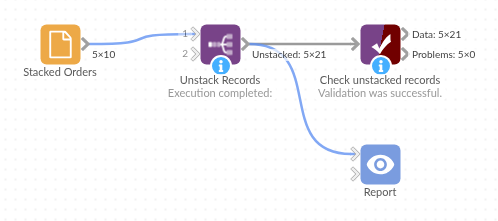
The demo project's workflow: the sample data, the block, and a Validate data check on its output.
Language and libraries
Python. It uses pandas and numpy.
pandas and numpy are part of Omniscope's Python environment. It needs nothing else installed.
Tested
The block is covered by automated tests that run its script against a stand-in for Omniscope's Python API: the sample data, one or two fields, other separators, records with only missing values, field types kept, empty input, non-text fields and bad options, an input holding only the chosen field, and 200,000 records.