
Omniscope custom block · Preparation
Text from a web feed reading Café mugs & saucers? Turn the HTML references back into é, &, £ and the rest, so the text matches, sorts and reads as it should.
Python · pandas · nothing extra to install
The problem it solves
A homeware shop's product feed comes from its web platform with the titles HTML-escaped: Café mugs & saucers, Wool throw £45 → £39, Hose 15 m & reel. In a report the titles look broken, a join to the stock list on title finds nothing, and a filter for "café" misses the mugs.
This block turns the references back into the characters they stand for, in a new field.
- 12 product titles in, 12 out
- 10 titles changed: named (
é,£,→), decimal (–) and hexadecimal (☕) references - 2 non-breaking spaces turned into ordinary spaces, so "15 m" matches "15 m" elsewhere
- 1 double-escaped title (
&) fixed by ticking one option
How it works
- Every HTML5 named reference, and every decimal and hexadecimal one, is converted; text that is not a reference (
R&D) is left alone. - Non-breaking spaces become ordinary spaces (an option, ticked by default).
- Ticking Repeat for double-escaped text keeps unescaping until nothing changes.
What goes in
Product feed
12 invented product titles from a homeware shop's web platform.
| SKU | Category | Title |
|---|---|---|
| HB-101 | Kitchen | Café mugs & saucers (set of 4) |
| HB-102 | Kitchen | Cast iron pan – 28 cm |
| HB-105 | Home | Wool throw £45 → £39 |
| HB-107 | Kitchen | Tea towels & oven glove |
| HB-110 | Home | R&D sample cushion |
| HB-111 | Kitchen | Espresso cups ☕ x2 |
12 rows in the sample file.
The options
| Option | Demo setting | What it does |
|---|---|---|
| Text to unescape | Title |
The text field holding the escaped text. |
| Unescaped field name | Clean title |
Name of the new field; give it the name of the field being unescaped to replace that field. |
| Repeat for double-escaped text | unticked | Tick to unescape until nothing changes (&lt; to <). |
| Non-breaking spaces as plain spaces | ticked | becomes an ordinary space. |
What comes out
Unescaped records (selected rows)
| SKU | Title | Clean title |
|---|---|---|
| HB-101 | Café mugs & saucers (set of 4) | Café mugs & saucers (set of 4) |
| HB-102 | Cast iron pan – 28 cm | Cast iron pan – 28 cm |
| HB-103 | Bird feeder "Robin" | Bird feeder "Robin" |
| HB-105 | Wool throw £45 → £39 | Wool throw £45 → £39 |
| HB-107 | Tea towels &amp; oven glove | Tea towels & oven glove |
| HB-108 | Reading lamp <LED> | Reading lamp <LED> |
| HB-110 | R&D sample cushion | R&D sample cushion |
| HB-111 | Espresso cups ☕ x2 | Espresso cups ☕ x2 |
12 records; HB-109 has no title and stays empty. HB-107 was escaped twice, so one pass leaves &; with Repeat for double-escaped text ticked it reads "Tea towels & oven glove".
Where it pays off
E-commerce: Product feeds
Clean product titles and descriptions from a web platform or marketplace export before matching them to stock, prices or a catalogue.
Content and SEO: Page audits
Read page titles and meta descriptions from a crawl as they appear to visitors, and measure their length on the real characters.
Customer feedback: Reviews and comments
Make review text from a website or app store export readable in a report, and searchable for words with accents.
Integration: Web API responses
Unescape text fields from APIs and RSS feeds that return HTML-escaped strings.
Use cases describe typical scenarios and are illustrative; the sample data is invented.
Why do this in Omniscope
- Clean titles straight into the stock join. The unescaped title feeds the Join to the stock list and the Report's product table, so "Café mugs & saucers" matches without a manual clean-up of each feed.
- Every feed refresh cleaned the same way. New products with new references are converted on the next run, and the tests pin the result for named, numeric and double-escaped references and for non-breaking spaces.
- Choices the feed needs. Double-escaped text and non-breaking spaces are settings; the conversion is Python's own
html.unescapein a short script you can open and change in the block's editor.
How it fits into an Omniscope workflow
Product feed (File or web connector) → Unescape HTML → Join (stock list, on Clean title) → Report
Connect the records, choose the field holding the escaped text, and run. If the output still holds & or <, the source was escaped twice: tick Repeat for double-escaped text.
Try it
- Open the demo project (
demo.ioxon the demo server, or importdemo.iozfrom this folder): 12 product titles from a web feed. - The question: what do the product titles actually say?
- Open Unescape HTML: field Title, new field name Clean title. Run it.
- Look at the output: "Café mugs & saucers (set of 4)", "Wool throw £45 → £39", and "R&D sample cushion" unchanged.
- Tick Repeat for double-escaped text and run again: HB-107 becomes "Tea towels & oven glove".
Running in Omniscope
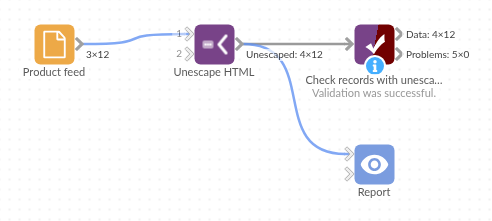
The demo project's workflow: the sample data, the block, and a Validate data check on its output.
Language and libraries
Python. It uses pandas and the standard library's html module.
pandas is part of Omniscope's Python environment. It needs nothing else installed.
Tested
The block is covered by automated tests that run its script against a stand-in for Omniscope's Python API: the sample titles, missing values, double-escaped text, non-breaking spaces, naming and replacing the field, a clash with an existing field, references without a semicolon, values that are not text, empty input and bad options, and 200,000 records.