
Omniscope custom block · Preparation
Building links from your data? Encode the search terms, names and parameters first, so spaces, &, # and accented letters don't break the link.
Python · pandas · nothing extra to install
The problem it solves
A marketing team wants a tracked search link for each campaign: https://www.example.com/search?q= followed by the campaign's search term. Pasting the term straight in works for "tea for two" in some browsers, but not for "fish & chips" (the & ends the search term), "Zoë's #1 pick" (the # cuts the link short), "C++ for beginners" (the + signs read as spaces) or "50% off" (% starts a code).
This block encodes each term into a new field, ready to join onto the start of the link.
- 12 search terms in, 12 records out
- 11 encoded, including
&,#,+,%,?,=,£and accented letters - 1 missing term left missing, not turned into the text "None"
How it works
- Letters, digits and
_ . - ~stay as they are; every other character becomes the%codes of its UTF-8 bytes (éis%C3%A9). - Slashes are kept unless Encode slashes is ticked; Spaces as + gives the form style.
- The encoded text goes into a new field after the input fields, or replaces the field if given its name.
What goes in
Campaign search terms
12 invented campaign search terms, as typed by the campaign team.
| Campaign | Channel | Search term |
|---|---|---|
| SPR-01 | café crème | |
| SPR-02 | fish & chips | |
| SPR-04 | Social | C++ for beginners |
| SPR-07 | Display | Zoë's #1 pick |
| SPR-08 | Social | St Ives / Penzance |
| SPR-09 |
12 rows in the sample file.
The options
| Option | Demo setting | What it does |
|---|---|---|
| Text to encode | Search term |
The text field to encode. |
| Encoded field name | Encoded term |
Name of the new field; give it the name of the field being encoded to replace that field. |
| Encode slashes | unticked | Tick to encode / as %2F, for text that goes into one part of a path. |
| Spaces as + | unticked | Tick for + instead of %20 (form style). |
What comes out
Encoded records (selected rows)
| Campaign | Search term | Encoded term |
|---|---|---|
| SPR-01 | café crème | caf%C3%A9%20cr%C3%A8me |
| SPR-02 | fish & chips | fish%20%26%20chips |
| SPR-03 | 50% off | 50%25%20off |
| SPR-04 | C++ for beginners | C%2B%2B%20for%20beginners |
| SPR-07 | Zoë's #1 pick | Zo%C3%AB%27s%20%231%20pick |
| SPR-08 | St Ives / Penzance | St%20Ives%20/%20Penzance |
| SPR-09 | ||
| SPR-10 | size=10 & colour=blue | size%3D10%20%26%20colour%3Dblue |
12 records. A Field Organiser formula then joins https://www.example.com/search?q= and the Encoded term into a working link.
Where it pays off
Marketing: Tracked links
Build search, landing-page or tracking links per campaign, product or region from a table of terms.
Reporting: Drill-through links
Add a link per record to a page in another system (a ticket, an order, a customer record) whose address includes a name or code with spaces or symbols.
Integration: Web requests
Prepare the query values for a web request made later in the workflow, for example a search or lookup API that takes a name in its address.
Data publishing: File and path names
Encode names used in download links or file paths, where / must be encoded too (tick Encode slashes).
Use cases describe typical scenarios and are illustrative; the sample data is invented.
Why do this in Omniscope
- Terms to clickable links in one workflow. The encoded term feeds a Field Organiser formula that builds the link, and the Report shows it as a link next to the campaign's figures.
- Links rebuilt with the data. A new or edited search term gets its link on the next refresh, so the Report never shows a link someone made by hand from an older list.
- Encoding choices in the block. Slashes and the form-style
+are settings; the encoding is Python's ownurllib.parse.quotein a short script that you can open by unlocking the block's design.
How it fits into an Omniscope workflow
Campaign terms (File) → URL Encode → Field Organiser (link formula) → Report
Connect the records holding the text, choose the field, and run. Encode only the values (the search term, the parameter), never a whole link: encoding https:// turns the : and / into codes too.
Try it
- Open the demo project (
demo.ioxon the demo server, or importdemo.iozfrom this folder): 12 campaign search terms. - The question: what link should each campaign use?
- Open URL Encode: field Search term, new field name Encoded term. Run it.
- Look at the output: "fish & chips" becomes
fish%20%26%20chips, "Zoë's #1 pick" becomesZo%C3%AB%27s%20%231%20pick, and SPR-09 has no term and stays empty. - Tick Spaces as + and run again: spaces become
+, and the+signs in "C++ for beginners" stay encoded as%2B.
Running in Omniscope
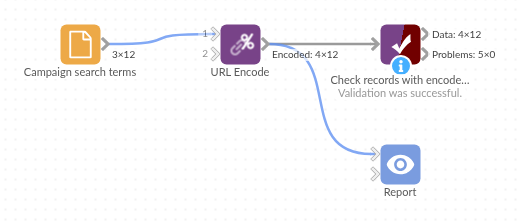
The demo project's workflow: the sample data, the block, and a Validate data check on its output.
Language and libraries
Python. It uses pandas and the standard library's urllib.parse.
pandas is part of Omniscope's Python environment. It needs nothing else installed.
Tested
The block is covered by automated tests that run its script against a stand-in for Omniscope's Python API: the sample terms, missing values, encoding slashes and spaces as +, naming and replacing the field, a clash with an existing field, values that are not text, empty input and bad options, and 200,000 records.