
Omniscope custom block · Preparation
Durations typed as 0:04:35, 12 min and 1h 5m, times stored as dates? Turn them into plain minutes (or seconds, or hours) that add up, average and compare with a target.
Python · pandas · nothing extra to install
The problem it solves
A support team logs each call's start time and how long it took. The start time is a date; the handling time was typed by whoever took the call: 0:04:35, 12 min, 1h 5m, PT18M, 45 s, 2h. Total handling time per agent, or the share of calls handled within 15 minutes, can't be worked out until those are numbers in one unit.
This block adds a number field for each chosen field: the handling time in minutes, and the start time as minutes since midnight (for calls by time of day).
- 12 calls in, 12 out, with two new number fields
- 10 handling times read from 6 different styles of writing them
- 1 handling time that can't be read ("about 10 min") left empty and counted in the block's message
- 265.8 minutes of handling in all, ready to sum by agent
How it works
- Date fields give the time since midnight; the date is ignored.
- Text is read as a duration:
0:04:35,08:30(hours and minutes),1 day 02:00:00,12 min,1h 5m,PT18M. - Each chosen field gets a new field with the unit added to its name (
Handling time_m).
What goes in
Support calls
12 invented support calls over two days.
| Call | Agent | Started | Handling time |
|---|---|---|---|
| C-0401 | Priya | 2025-05-12 08:31:15 | 0:04:35 |
| C-0402 | Tom | 2025-05-12 08:47:00 | 12 min |
| C-0403 | Priya | 2025-05-12 09:05:40 | 1h 5m |
| C-0407 | Priya | 2025-05-12 13:15:30 | PT18M |
| C-0409 | Ana | 2025-05-12 15:12:00 | 45 s |
| C-0411 | Tom | 2025-05-13 08:05:00 | about 10 min |
12 rows in the sample file.
The options
| Option | Demo setting | What it does |
|---|---|---|
| Fields to convert | Started, Handling time |
Date fields (time since midnight) or text fields holding durations. |
| Unit | Minutes | Milliseconds, seconds, minutes or hours; its letter is added to each new field's name. |
What comes out
Converted records (selected rows)
| Call | Started | Handling time | Started_m | Handling time_m |
|---|---|---|---|---|
| C-0401 | 2025-05-12 08:31:15 | 0:04:35 | 511.25 | 4.58 |
| C-0402 | 2025-05-12 08:47:00 | 12 min | 527 | 12 |
| C-0403 | 2025-05-12 09:05:40 | 1h 5m | 545.67 | 65 |
| C-0406 | 2025-05-12 12:02:45 | 722.75 | ||
| C-0407 | 2025-05-12 13:15:30 | PT18M | 795.5 | 18 |
| C-0409 | 2025-05-12 15:12:00 | 45 s | 912 | 0.75 |
| C-0411 | 2025-05-13 08:05:00 | about 10 min | 485 | |
| C-0412 | 2025-05-13 10:30:00 | 2h | 630 | 120 |
12 records (minutes shown to two decimal places). The block's message reads "Not read as a time or duration (left empty): 1 in Handling time". By agent: Ana 128.6 minutes over 3 calls, Priya 96.6 over 4, Tom 40.7 over 3.
Where it pays off
Customer service: Handling and wait times
Turn typed or exported call, chat and ticket durations into minutes to report averages per agent and the share within target.
Workforce: Timesheets
Add up hours worked from entries such as 7:30 or 7h 30m, and compare them with contracted hours.
Operations: Machine and process logs
Convert run times, downtime and cycle times logged in mixed formats into seconds for statistics and control charts.
Sport and events: Results
Turn finishing times (1:45:20.5) into seconds to rank, average or chart them.
Use cases describe typical scenarios and are illustrative; the sample data is invented.
Why do this in Omniscope
- Typed durations to agent totals. The minutes feed an Aggregate by agent and the Report's handling-time chart in the same workflow, straight from the call log.
- Unreadable entries counted, not hidden. Each run's message says how many durations could not be read, and they are left empty rather than set to zero, so they never drag down an average.
- The duration rules are in the script. Two-part times as hours and minutes, and bare numbers refused, are lines in the block's Python script; change them there if your logs use minutes and seconds.
How it fits into an Omniscope workflow
Call log (File) → Time Duration Unit Converter → Aggregate (by Agent: sum and mean of Handling time_m) → Report
Choose the fields and one unit for all of them. To check that every duration was read, filter on an empty new field, or add a Validate data block that requires a value.
Try it
- Open the demo project (
demo.ioxon the demo server, or importdemo.iozfrom this folder): 12 support calls. - The question: how many minutes did each agent spend on calls?
- Open Time Duration Unit Converter: fields Started and Handling time, unit Minutes. Run it.
- Look at the output:
Handling time_mholds 4.58 for0:04:35, 65 for1h 5mand 18 forPT18M; C-0411's "about 10 min" is empty, and the block's message says so. - Change the unit to Seconds and run again: the new fields are
Started_sandHandling time_s, with 275 for0:04:35.
Running in Omniscope
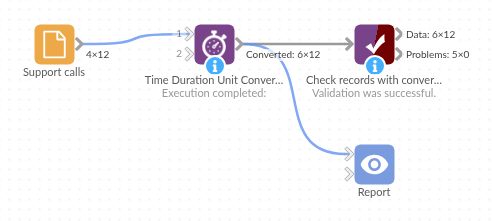
The demo project's workflow: the sample data, the block, and a Validate data check on its output.
Language and libraries
Python. It uses pandas.
pandas is part of Omniscope's Python environment. It needs nothing else installed.
Tested
The block is covered by automated tests that run its script against a stand-in for Omniscope's Python API: the sample calls, each unit, missing dates, hours-and-minutes text, worded, clock-style and ISO durations, bare numbers, empty input, bad choices and missing fields, and 200,000 records.