Omniscope custom block · Preparation
Q1, Q10, Q11, Q2? Fields in the order a person would put them, with the ID kept at the front, and the order kept when the next export adds a field.
Python · pandas · nothing extra to install
The problem it solves
A survey tool exports one field per question, in the order the questions were last edited: question 10 first, the respondent ID second, question 2 third. A plain alphabetical sort is no better: it puts Q10 and Q11 before Q2, and capitalised names before lower-case ones.
This block sorts the fields the way a person reads them, numbers in names by value, and keeps the fields you choose at the front.
- 8 fields reordered, 8 records unchanged
- Q1 to Q4, then Q10 and Q11, after the respondent ID
- By type: the three text answers, then the three numbers, then the submission date
How it works
- By name: case is ignored and each run of digits is compared as a number.
- By type: text, numbers (Integer and Decimal together), dates, yes/no; by name within each.
- Fields to keep first come first, in the order chosen.
What goes in
Survey responses
8 invented responses to a customer survey, with the fields in the order the survey tool exported them.
| Q10 Recommend Score | Respondent | Q2 Age Band | Submitted | Q1 Region | Q11 Comment | Q3 Visits Per Year | Q4 Spend Per Visit |
|---|---|---|---|---|---|---|---|
| 9 | R-001 | 35-44 | 2025-05-02 | North West | Friendly staff | 12 | 18.50 |
| 6 | R-002 | 25-34 | 2025-05-02 | London | Queues at lunchtime | 30 | 7.20 |
| 10 | R-003 | 55-64 | 2025-05-03 | Scotland | 4 | 42.00 |
8 rows in the sample file.
The options
| Option | Demo setting | What it does |
|---|---|---|
| Sort fields by | Name | Case-insensitive; numbers in names compared by value. |
| Fields to keep first | Respondent |
Stays at the start. |
What comes out
Sorted by name
| Respondent | Q1 Region | Q2 Age Band | Q3 Visits Per Year | Q4 Spend Per Visit | Q10 Recommend Score | Q11 Comment | Submitted |
|---|---|---|---|---|---|---|---|
| R-001 | North West | 35-44 | 12 | 18.50 | 9 | Friendly staff | 2025-05-02 |
| R-002 | London | 25-34 | 30 | 7.20 | 6 | Queues at lunchtime | 2025-05-02 |
| R-003 | Scotland | 55-64 | 4 | 42.00 | 10 | 2025-05-03 |
8 records, 8 fields. Sorted by type instead, the order is Respondent, Q1 Region, Q2 Age Band, Q11 Comment, Q3 Visits Per Year, Q4 Spend Per Visit, Q10 Recommend Score, Submitted.
Where it pays off
Surveys: Questions in question order
Put numbered question fields in their natural order before building a table view or exporting to a spreadsheet.
Pivots and time series: Period fields
After a Pivot that makes one field per week or month (Week 1 to Week 52), keep them in sequence, with the grouping field first.
Data handover: Predictable exports
Give a file sent to another team or system a stable field order, so a field added upstream does not move the others.
Exploration: Wide tables
Group a wide table's fields by type to see at a glance which are measures, which are categories and which are dates.
Use cases describe typical scenarios and are illustrative; the sample data is invented.
Why do this in Omniscope
- Ordered where the data is shaped: the sorted fields go on to a Table view in the Report or to an output file with no extra step, and Respondent stays the first column.
- A rule, not a list: the order is worked out again on every run, so when next month's export adds Q12, it lands after Q11 in the scheduled output without anyone editing the block.
- The sort the core blocks don't offer: numbers in field names in numeric order, case ignored, and fields pinned first; the rule is a few lines in the block's editor if you want another.
How it fits into an Omniscope workflow
Survey export (File) → Sort fields → Report (Table view) or Output file
Put it last in a branch, just before the output or the Report, since a later Join or Field organiser can change the order again.
Try it
- Open the demo project (
demo.ioxon the demo server, or importdemo.iozfrom this folder): 8 survey responses with the fields in export order. - The question: can the table read Respondent, then the questions in order?
- Open Sort fields: sort by Name, keep
Respondentfirst. Run it. - Look at the output: Respondent, Q1 to Q4, Q10, Q11, Submitted.
- Switch to Type and run again: the text answers, then the numbers, then the date, after Respondent.
Running in Omniscope
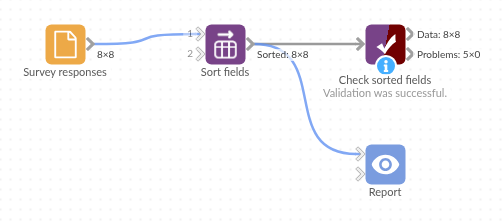
The demo project's workflow: the sample data, the block, and a Validate data check on its output.
Language and libraries
Python. It uses pandas.
pandas is part of Omniscope's Python environment. It needs nothing else installed.
Tested
The block is covered by automated tests that run its script against a stand-in for Omniscope's Python API: the sample data by name and by type, case, fields kept first, the same order in every streamed chunk, yes/no and Date fields, empty input, a bad choice, and 50,000 records with 200 fields.