
Omniscope custom block · Preparation
One date field, five formats, two time zones? Real Date fields from every value that holds a date, and a flag on the ones that don't.
Python · pandas, python-dateutil · nothing extra to install
The problem it solves
A buyer combines delivery records from six suppliers. Each supplier's system writes dates its own way: ISO timestamps in UTC, UK day/month dates, named months, compact 250307 codes, local times with a +01:00 offset. Until they are one Date field they can't be sorted, filtered by month or subtracted to get lead times.
This block reads every value on its own and writes a Date field beside the original, with a _failed field marking the values that could not be read.
- 12 deliveries in, 12 out, each with two parsed Date fields
- 5 order-date formats in one field, plus a compact
yymmddcode read with a custom format - 2 order dates flagged:
March 2025(no day) and31/02/2025(no such date) - 2 delivery times with
+01:00converted to UTC, and one missing delivery date left empty, not flagged
How it works
- Custom formats are tried first, then a general parser with your Day first setting, then with the other setting, then a list of fixed formats.
- A value starting with a four-digit year is always year-month-day, so
2025-03-04stays 4 March with Day first ticked. - A value must hold a year, a month and a day; anything less fails rather than borrowing parts of today's date.
What goes in
Supplier deliveries
12 invented deliveries from six suppliers, with an order date and a delivery time in each supplier's own format.
| Delivery | Supplier | Order Date | Delivered At |
|---|---|---|---|
| D-101 | Hartwell Foods | 2025-03-04 | 2025-03-06T09:30:00Z |
| D-103 | Pennine Packaging | 04/03/2025 | 06/03/2025 11:20 |
| D-105 | Calder Print | 5 March 2025 | 7 Mar 2025 16:00 |
| D-106 | Calder Print | March 12, 2025 | 2025-03-14 10:15:00+00:00 |
| D-107 | Ostler Wholesale | 250307 | 2025-03-10T08:50:00+01:00 |
| D-109 | Brightwater Trading | 20250319 | 21-03-2025 13:30 |
| D-110 | Brightwater Trading | 2025-03-20 | |
| D-111 | Kestrel Supplies | March 2025 | 2025-03-25 12:00 |
| D-112 | Kestrel Supplies | 31/02/2025 | 2025-03-27 12:00 |
12 rows in the sample file.
The options
| Option | Demo setting | What it does |
|---|---|---|
| Fields to parse | Order Date, Delivered At |
The text fields holding dates. |
| Output suffix | _parsed |
Added to the name of each parsed field; empty replaces the field. |
| Day first | ticked | 04/03/2025 is 4 March. |
| Add failure flag | ticked | Adds Order Date_parsed_failed and Delivered At_parsed_failed. |
| Keep original fields | ticked | The text fields stay beside the parsed ones. |
| Custom formats | %y%m%d |
Reads Ostler Wholesale's 250307 as 7 March 2025. |
What comes out
Parsed deliveries (selected records)
| Delivery | Order Date | Order Date_parsed | Order Date_parsed_failed | Delivered At_parsed |
|---|---|---|---|---|
| D-101 | 2025-03-04 | 2025-03-04 | false | 2025-03-06 09:30 |
| D-103 | 04/03/2025 | 2025-03-04 | false | 2025-03-06 11:20 |
| D-105 | 5 March 2025 | 2025-03-05 | false | 2025-03-07 16:00 |
| D-107 | 250307 | 2025-03-07 | false | 2025-03-10 07:50 |
| D-109 | 20250319 | 2025-03-19 | false | 2025-03-21 13:30 |
| D-110 | 2025-03-20 | 2025-03-20 | false | |
| D-111 | March 2025 | true | 2025-03-25 12:00 | |
| D-112 | 31/02/2025 | true | 2025-03-27 12:00 |
12 records, 8 fields. Without the custom format, 250307 would be read as 25 March 2007; D-107's delivery at 08:50 +01:00 is 07:50 UTC.
Where it pays off
Purchasing: Supplier and carrier feeds
Combine delivery, invoice and shipping dates from several suppliers' exports and compute lead times on one Date field.
Finance: Bank and card statements
Statement exports from different banks write dates differently; parse them into one field before reconciling.
Data migration: Legacy systems
Old systems and hand-kept spreadsheets mix formats within one column; the _failed flag gives the list of values to correct by hand.
Web and event data: Timestamps with offsets
Event logs with Z and +01:00 timestamps come out in UTC, so events from different sources sort in the right order.
Use cases describe typical scenarios and are illustrative; the sample data is invented.
Why do this in Omniscope
- Mixed formats in, one Date field out, inside the workflow: the parsed fields go straight on to a Field organiser lead-time formula, a Record filter on the
_failedflag, and the charts in the Report, with no export and clean-up in another tool. - The same reading every run: the next supplier file is parsed by the same rules (and the same day-first setting), and when a new format appears its values are flagged in
Order Date_parsed_failed, ready for a Record filter to route to a review table, instead of slipping through as empty dates. - Formats the core blocks don't know: add a code to Custom formats for a supplier's own style, or unlock the block's design and open the script to change the order of attempts.
How it fits into an Omniscope workflow
Supplier files (Append files) → Smart Date Parser → Record filter (_failed true, to a review table) → Field organiser (lead time in days) → Report
Put it straight after the source, before anything that groups or filters by date.
Try it
- Open the demo project (
demo.ioxon the demo server, or importdemo.iozfrom this folder): 12 deliveries from six suppliers. - The question: how many days did each delivery take from order?
- Open Smart Date Parser: fields Order Date and Delivered At, Day first ticked, custom format
%y%m%d. Run it. - Look at the output: every order date is 4 to 20 March 2025 except D-111 and D-112, which are flagged.
- Clear Custom formats and run again: D-107 and D-108 now show 2007 and 2014. Untick Day first: D-103 becomes 3 April, while D-101 (
2025-03-04) stays 4 March.
Running in Omniscope
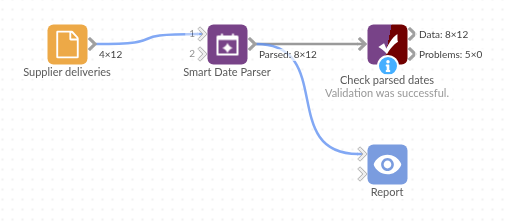
The demo project's workflow: the sample data, the block, and a Validate data check on its output.
Language and libraries
Python. It uses pandas and python-dateutil.
Both are part of Omniscope's Python environment. It needs nothing else installed.
Tested
The block is covered by automated tests that run its script against a stand-in for Omniscope's Python API: the sample data, ISO dates with Day first ticked, month-first dates, mixed time zones, incomplete dates, custom formats tried first, the option defaults, in-place parsing and dropped originals, number and Date fields, empty input, bad options, and 100,000 values.