
Omniscope custom block · Outputs
Built a clean table in Omniscope that others need in BigQuery? Load it into a BigQuery table on every run, appended or replaced, with field names made into valid column names.
Python · pandas, google-cloud-bigquery, pyarrow, db-dtypes · Google libraries installed on first run
The problem it solves
A workflow cleans, joins and enriches data, and the result is wanted in BigQuery: for another team's dashboards, for a data science notebook, or to keep history. Exporting a CSV and uploading it by hand each day is slow and easy to forget, and field names such as "Revenue (£)" are not valid BigQuery column names.
This block loads the records on its input into a BigQuery table on every run.
- 20 daily store totals in the invented demo input, 4 stores over 5 days
- 5 fields, 4 of them renamed for BigQuery:
Sale date→Sale_date,Revenue (£)→Revenue____ - appended to the table by default, or replacing it
How it works
- Field names are made valid for BigQuery (letters, digits and underscores; names that clash get
_2), and the message lists every renamed field. - The records go to BigQuery as one load job. The table is created if it doesn't exist, with column types from the field types.
- Append adds the records; untick it to replace the table's records and columns on every run.
What goes in
Store daily totals
Invented daily totals for four shops, as a workflow might produce them from till data.
| Store | Sale date | Units sold | Revenue (£) | Click & collect % |
|---|---|---|---|---|
| Leeds | 2026-03-02 | 120 | 1204.76 | 17.9 |
| York | 2026-03-02 | 136 | 1010.34 | 6.3 |
| Bristol | 2026-03-02 | 73 | 587.09 | 6.1 |
| Exeter | 2026-03-02 | 86 | 536.97 | 30.0 |
20 rows in the sample file.
The options
| Option | Demo setting | What it does |
|---|---|---|
| JSON key file | (yours) | A service account's key file on the server; empty for the server's own credentials. |
| Table ID | example-project.retail.store_daily_totals |
The table to load into, as project.dataset.table. |
| Append records | ticked | Add the records; untick to replace the table on every run. |
What comes out
In BigQuery: the table store_daily_totals
| Store | Sale_date | Units_sold | Revenue____ | Click___collect__ |
|---|---|---|---|---|
| Leeds | 2026-03-02 00:00:00 UTC | 120 | 1204.76 | 17.9 |
| York | 2026-03-02 00:00:00 UTC | 136 | 1010.34 | 6.3 |
20 rows loaded (2,172 units, £17,798.84). The block has no output of its own; its message says "Appended 20 records in example-project.retail.store_daily_totals" and lists the renamed fields. Omniscope dates load as TIMESTAMP columns.
Where it pays off
Data teams: Publishing cleaned data
Load the output of a cleaning and matching workflow into BigQuery for other teams to query.
Forecasting: Writing predictions back
Append each day's forecast or score to a table, building a history to compare with actuals.
Finance: Monthly snapshots
Replace a snapshot table each month with the latest reconciled figures.
Operations: Feeding other dashboards
Keep a BigQuery table up to date for tools that read only from the warehouse.
Use cases describe typical scenarios and are illustrative; the sample data is invented.
Why do this in Omniscope
- Prepare and publish in one workflow: the blocks that clean and total the till data feed this block directly, so the table in BigQuery is always the output of the same steps.
- The same load on every run: scheduled, the project rebuilds the totals and appends them; a Validate data block before this one can stop a run with missing or unexpected values before anything reaches BigQuery.
- Column names handled: names Omniscope allows but BigQuery refuses (spaces, symbols, names differing only in case) are renamed predictably, and the message says how.
- Adjustable load: around 100 lines of Python drive it; set partitioning or clustering on the load job, or a schema, if the table needs them.
How it fits into an Omniscope workflow
File (till export) → Aggregate (totals by store and day) → Validate data → Google BigQuery Export (retail.store_daily_totals)
Rename fields in a Field Organiser first if you want tidier column names than the automatic ones.
Try it
- Open the demo project (
demo.ioxon the demo server, or importdemo.iozfrom this folder). It holds a File block with the 20 store totals feeding the block, which is not signed in to Google Cloud, so it does not run there. - The question: how would these totals look as a BigQuery table?
- Look at the File block's output: 20 records with the field names above.
- To load into your own project: create a service account with BigQuery Job User on the project and BigQuery Data Editor on a dataset, save its JSON key on the server, choose it in the block, enter
your-project.your_dataset.store_daily_totalsand run it. The table is created; run again and the records are appended.
Running in Omniscope
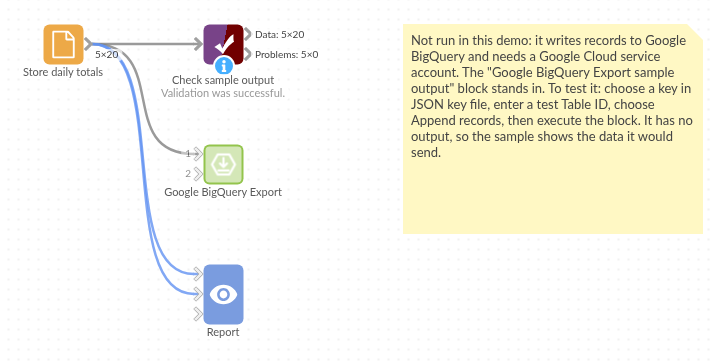
The demo project's workflow: the sample totals in a File block, a Validate data check, and the block.
Language and libraries
Python. It uses pandas, google-cloud-bigquery, pyarrow and db-dtypes.
pandas is part of Omniscope's Python environment. google-cloud-bigquery, pyarrow and db-dtypes (all Apache License 2.0) are listed in the manifest's dependencies; Omniscope installs them on first run if they are missing.
Tested
The block is covered by automated tests that run its script against a stand-in for Omniscope's Python API and a stand-in for Google's BigQuery library that records the load it would send (no call reaches Google): the sample loaded with the expected column names and types, append and replace, names that clash or use reserved prefixes, an emptied key file and a key file, empty input, an unconnected input, an empty table ID and a load error, mixed field types, and 300,000 records.