
Omniscope custom block · Inputs
Application data in MongoDB, and the report needs it as a table? Read a collection, or the documents matching a query, one record per document, with nested parts kept as JSON.
Python · pandas, pymongo · pymongo installed on first run
The problem it solves
Web and mobile applications often keep their data in MongoDB: users, orders, enrolments, events, each a document with nested parts. Reporting on it means getting the documents out as rows, with the identifiers, decimals and dates in forms a report can use.
This block reads the collection (or the documents matching a query) and outputs one record per document.
- 10 enrolment documents in the invented demo collection, with up to 8 top-level keys
_idObjectIds as text, fees (Decimal128) as numbers: £98,951.50 in all- nested
addressandmodulesas JSON text; 1 document without an address left empty - 1 document with the text "unknown" in
age: the field becomes text so the value is kept
How it works
- Connects with a connection URL, or host and port with an optional user; an unreachable server stops it after 20 seconds.
- Reads every document, or those matching the JSON query, up to the limit.
- Top-level keys become fields; objects and arrays become JSON text; ObjectId and similar values become text; a key mixing numbers and text becomes text.
What goes in
Enrolments (a MongoDB collection)
Invented enrolment documents for a college, for example:
{
  "_id": ObjectId("6650a1b2c3d4e5f6a7b8c900"),
  "name": "Amira Haddad", "age": 19, "course": "Data Science",
  "fees": NumberDecimal("9250.00"),
  "enrolled": ISODate("2025-09-22T09:00:00Z"),
  "address": {"town": "Leeds", "postcode": "LS2"},
  "modules": ["Statistics 1", "Python for analysts"]
}
10 documents in the invented collection college.enrolments.
The options
| Option | Demo setting | What it does |
|---|---|---|
| Connection URL | empty | A full connection string; when given, used instead of the settings below. |
| Host, Port | 127.0.0.1, 27017 |
Where the server is. |
| User, Password, Authentication database | empty | Sign-in, if the server needs it (admin when the database is empty). |
| Database, Collection | college, enrolments |
What to read. |
| Whole collection | ticked | Read every document; untick to use the custom query. |
| Custom query | {"address.town": "Leeds"} (when unticked) |
A MongoDB filter in JSON. |
| Limit | empty | The most documents to read. |
What comes out
Documents (selected)
| _id | name | age | course | fees | enrolled | address | modules |
|---|---|---|---|---|---|---|---|
| 6650a1b2c3d4e5f6a7b8c900 | Amira Haddad | 19 | Data Science | 9250.0 | 2025-09-22 09:00:00 | {"town": "Leeds", "postcode": "LS2"} | ["Statistics 1", "Python for analysts"] |
| 6650a1b2c3d4e5f6a7b8c905 | Farid Aziz | unknown | Data Science | 11400.5 | 2025-09-22 09:05:00 | {"town": "Bradford", "postcode": "BD7"} | ["Databases"] |
| 6650a1b2c3d4e5f6a7b8c906 | Grace Liu | 19 | Geography | 9250.0 | 2025-09-23 09:06:00 | {"town": "York", "postcode": "YO10"} | [] |
| 6650a1b2c3d4e5f6a7b8c907 | Harry Dunn | 23 | Data Science | 11400.5 | 2025-09-24 09:07:00 | ["Statistics 1", "Machine learning"] |
10 records. With the custom query {"address.town": "Leeds"} and "Whole collection" unticked: 4 records (Amira Haddad, Chloe Evans, Erin Walsh, Jamal Reid).
Where it pays off
Product analytics: Users and events
Read user or event documents from an application's database and report sign-ups and activity.
E-commerce: Orders with nested lines
Read order documents, then expand the nested lines with the JSON blocks to report products and baskets.
Education and membership: Enrolments
Report enrolments per course and fees per town from a student records collection, as in the demo.
Operations: Device and log documents
Pick up readings or logs written to MongoDB by devices and services, filtered by a query.
Use cases describe typical scenarios and are illustrative; the sample data is invented.
Why do this in Omniscope
- Documents to report in one workflow: the collection's records go through the JSON blocks, joins and aggregations into the report, so fees per course come from the live collection.
- The same read on every run: the query, the type clean-up and the handling of mixed keys run identically each time it is scheduled, so a key that turns up with text in a new document arrives as a text field rather than breaking the run.
- A query, not a dump: the JSON filter and the limit are sent to MongoDB, so only the documents the report needs travel.
- Room to grow: the code is about 110 lines of Python; add a projection, a sort or an aggregation pipeline where a plain filter isn't enough.
How it fits into an Omniscope workflow
MongoDB (college.enrolments) → JSON Expand fields (address) → Aggregate (fees by course and town) → Report
Expand the JSON text fields before using their parts; the _id text is a stable key for joins.
Try it
- Open the demo project (
demo.ioxon the demo server, or importdemo.iozfrom this folder). It holds the block, not connected to any server, and a File block withplaceholder.csv: the block's output for the invented collection. The rest of the workflow runs from the File block. - The question: how much in fees comes from each course?
- Look at the File block's output: 10 records, address and modules as JSON text, age as text because of the "unknown".
- To read your own collection: enter a connection URL (or host, port and sign-in), the database and the collection, and run it. Then connect it in place of the File block.
- Untick "Whole collection" and enter a custom query such as
{"course": "Economics"}: only those documents arrive.
Running in Omniscope
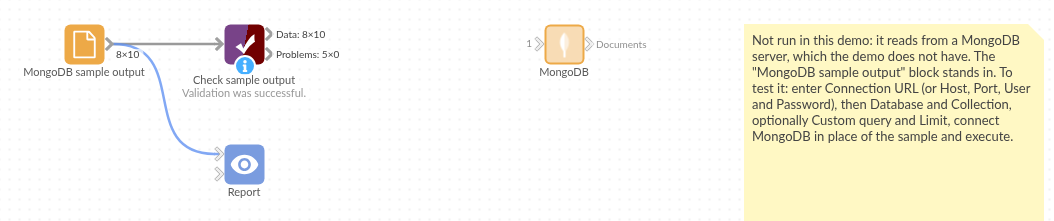
The demo project's workflow: the block, its sample output in a File block, and a Validate data check on it.
Language and libraries
Python. It uses pandas and pymongo.
pandas is part of Omniscope's Python environment. pymongo (Apache License 2.0) is listed in the manifest's dependencies; Omniscope installs it on first run if it is missing.
Tested
The block is covered by automated tests that run its script against a stand-in for Omniscope's Python API and a stand-in for MongoDB's driver that serves canned documents with ObjectId, Decimal128, dates, objects and arrays (no call reaches a server): the whole collection, a custom query and a limit, a field kept numeric, an emptied connection URL, sign-in without an authentication database, an empty collection, bad queries and settings, a timed-out server, and 100,000 documents.