
Omniscope custom block · Code & AI
A command-line step in the middle of a workflow: run a script or a tool before the data is read or after it is written, and see what it printed.
Python · pandas · nothing extra to install
The problem it solves
Some steps of a data job live outside Omniscope: a script that fetches or unzips the day's file, a tool that converts a format, a copy to a shared folder after the export is written. Run by hand or by a separate scheduled task, they drift out of step with the workflow, and when one fails nobody sees why.
The block runs those commands as a step of the workflow and records what each one did.
- 3 commands run from a list in a file, 1 empty line skipped
- 0 failures: each with exit code 0 and its output in a field
- a failing command stops the block with the end of its error output in the message, unless you choose to carry on
How it works
- Enter one command, or choose a field holding one command per record.
- Commands run one after another without a shell, as the user Omniscope runs as, each with a time limit.
- The input records pass through unchanged; the second output lists each command with its exit code, output, errors and, if it failed, why.
Before you use it, read the security section of the README: anyone who can edit a project can run any program on the server through this block, and commands taken from a field are only as safe as the data they come from.
What goes in
Nightly steps
An invented list of four steps, three of them harmless Python commands and one not filled in yet.
| Step | Description | Command |
|---|---|---|
| 1 | Check the Python version | python --version |
| 2 | Print a greeting | python -c "print('Hello from the server')" |
| 3 | Add two numbers | python -c "print(2 + 2)" |
| 4 | Not filled in yet |
4 rows in the sample file.
The options
| Option | Demo setting | What it does |
|---|---|---|
| Command | (empty) | One command to run; not used when a field is chosen. |
| Field with commands | Command | One command per record. |
| Carry on after a failed command | unticked | Stop at the first failure (unticked) or record it and go on (ticked). |
| Run through cmd /c (Windows) | unticked | Puts cmd /c in front of each command, for Windows shell commands. |
| Time limit (seconds) | 600 | Stop a command that runs longer than this. |
What comes out
Input data
The four steps, unchanged.
Commands
| cmd | code | stdout | stderr | error |
|---|---|---|---|---|
python --version |
0 | Python 3.11.2 | ||
python -c "print('Hello from the server')" |
0 | Hello from the server | ||
python -c "print(2 + 2)" |
0 | 4 |
Step 4 has no command, so it is skipped and counted in the block's message. The Python version is whatever the machine running the block has.
Where it pays off
Data preparation: Scripts as part of the job
Run a script that downloads, unzips or converts the day's files as one step of the scheduled workflow, with its result recorded.
File handling: Copy, move or archive
Copy files to a shared or archive folder (cmd /c copy ... on Windows, cp ... elsewhere), one record per file in a list.
Operations: Steps listed as data
Keep a list of maintenance commands in a file that only administrators can change, and run them in order, with a record of each result.
Integration: A tool with no block
Call a command-line tool, such as a converter or an in-house utility, and use what it prints in later blocks.
Use cases describe typical scenarios and are illustrative; the sample data is invented.
Why do this in Omniscope
- The command is a step of the workflow. Blocks connected after it run only once its commands have finished, and the whole job runs from one scheduled workflow instead of a workflow plus separate scripts run by hand.
- Failures stop the workflow, with the reason. A non-zero exit code stops the block with the end of the command's error output, so the blocks after it don't carry on as if it had worked; or tick "Carry on" and filter the Commands output on its error field.
- Results kept as data. Each command's exit code and output is a record, ready to be checked like any other data, and a Report can show when each step last ran and what it said.
How it fits into an Omniscope workflow
Command list (File) → Execute Command (Field with commands) → Commands: Validate data (error is empty) → Report
Feed it the records it should pass on, or the list of commands. Blocks after it run once the commands have finished, so a Validate data block on the Commands output can stop the rest of the workflow when a step fails.
Try it
- Open the demo project (
demo.ioxon the demo server, or importdemo.iozfrom this folder). The demo server does not run commands, so the demo shows the block, not configured, next to a File block holding the Commands output above. - The question: can a workflow run a command-line step and check that it worked?
- On your own server, add Execute Command, enter
python --version(or another harmless command your server has) and run it. - Look at the Commands output: the exit code 0 and the version it printed.
- Change the command to a program that doesn't exist and run again: the block stops with "Program not found" in its message.
Running in Omniscope
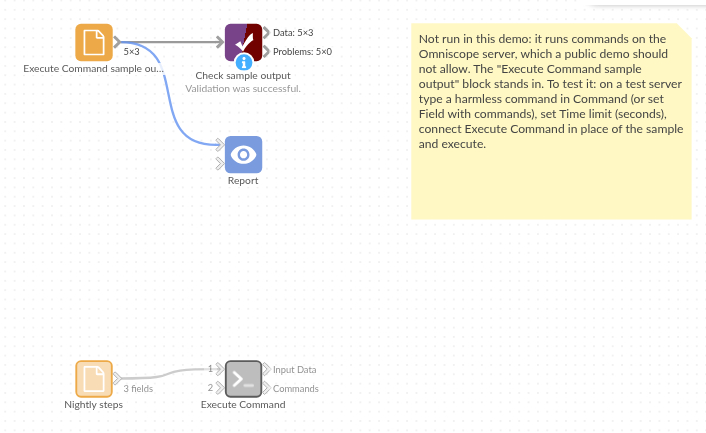
The demo project's workflow: the sample data, the block, and a Validate data check on its output.
Language and libraries
Python. It uses pandas, and Python's own subprocess and shlex modules to run the commands.
pandas is part of Omniscope's Python environment. It needs nothing else installed.
Tested
The block is covered by automated tests that run its script against a stand-in for Omniscope's Python API, using only the Python interpreter as the command: one command with the input passed through, no input, the sample commands from a field, failed commands (stopping, and carrying on), a program that doesn't exist, output that isn't UTF-8, the time limit, quoted arguments with no shell, the command line used on Windows and with cmd /c (checked without running it), set-up mistakes, empty input, and 20 commands with 200,000 records passed through.