
Omniscope custom block · Connectors
What did the card terminal take this month, by card type, clerk and day? Slim CD gateway transactions as typed records, searched with the gateway's own filters.
Python · requests, pandas · requests installed on first run if missing
The problem it solves
A shop or service business taking cards through Slim CD sees its transactions in the gateway's web screens, one search at a time. Reconciling them with the till, the accounts or the bank, or reporting takings by day and card type, needs them as data.
This block runs a Slim CD transaction search with the gateway's own filters and writes the result as records: dates as dates, amounts as numbers, ZIP codes kept as text.
- 36 invented transactions of a fictional shop, 1 to 17 October 2026
- 33 approved and 3 declined; 4 of the approved are returns
- 2,883.95 net card takings: 3,580.51 in sales less 696.56 in returns
- 1 search request per run, and 1 record with the count when you only want to know how many
How it works
- Enter the Slim CD username, password and Site ID, and a date range.
- Add filters if you want (customer, amount, transaction type, clerk); empty ones are not sent.
- Tick Record count only to check the size of a search first.
What goes in
Nothing from the workflow: the block reads from Slim CD. The demo uses an invented reply, so it runs without a Slim CD account; sample-data/placeholder.csv holds the block's output for it.
The options
| Option | Demo setting | What it does |
|---|---|---|
| Username, Password, Site ID | (your account) | Your Slim CD credentials and site. |
| Start date, End date | 2026-10-01, 2026-10-31 | The days to search. |
| Treat all output fields as text | unticked | Unticked: dates, amounts and IDs typed. |
| Record count only | unticked | One record with the count instead. |
| Max records, Reverse order | (empty), unticked | Limit and order the result. |
| Filters | (empty) | Name, e-mail, amount, transaction type, clerk and others. |
What comes out
Transactions (first 5, some fields)
| gateid | transactiondate | transtype | approved | cardtype | amount | firstname | lastname | zip | clerkname |
|---|---|---|---|---|---|---|---|---|---|
| 1840221000 | 2026-10-01 17:24 | SALE | Y | MC | 231.18 | Grace | Okoro | 02903 | Dana |
| 1840221007 | 2026-10-01 20:58 | SALE | Y | MC | 63.90 | Noah | Becker | 02139-4307 | Dana |
| 1840221014 | 2026-10-02 13:18 | SALE | Y | DISC | 112.03 | Liam | Novak | 06103 | Marcus |
| 1840221021 | 2026-10-02 17:01 | SALE | Y | VISA | 60.80 | Liam | Novak | 06103 | Marcus |
| 1840221028 | 2026-10-03 09:52 | RETURN | Y | AMEX | 175.88 | Liam | Novak | 06103 | Dana |
36 records in all, 42 fields. ZIP codes keep their leading zeros and ZIP+4 form.
Approved transactions by type (Record filter on approved = Y, Aggregate on transtype)
| transtype | Transactions | Amount |
|---|---|---|
| SALE | 29 | 3,580.51 |
| RETURN | 4 | 696.56 |
Where it pays off
Retail and hospitality: Daily takings
Card takings per day, clerk and card type, net of returns, next to the till's own figures.
Finance: Reconciliation
Match gateway transactions to bank deposits by batch number and date, and list the ones that do not match.
Operations: Declines and voids
Declined and voided transactions by clerk, card type and time of day, to spot terminal or training problems.
Customer service: Find a payment
Search by customer name, e-mail or amount to answer a payment query, with the full gateway record.
Use cases describe typical scenarios and are illustrative; the sample data is invented.
Why do this in Omniscope
- Gateway, till and bank in one workflow. The transactions join to till exports and bank statements on batch, date and amount, so the reconciliation and the takings report come from one place.
- The same fields every run. The block writes the same typed fields whether a search finds 0, 1 or thousands of transactions, so a scheduled daily run can feed a Validate data check (no declines above a threshold, takings within range) without breaking on a quiet day.
- Your own filters and fields. Filters are options; the list of fields and how each is typed is a short block of Python in the block's script, which you can open and change in the block editor.
How it fits into an Omniscope workflow
Slim CD Transaction → Record filter (approved = Y) → Formula (net amount: returns negative) → Aggregate (per day, clerk or card type) → Report
For reconciliation, join to the bank's deposit records on batch number and date.
Try it
- Open the demo project (
demo.ioxon the demo server, or importdemo.iozfrom this folder). It holds the Slim CD block without credentials, and a File block withplaceholder.csv: the 36 transactions the block writes for the invented reply. - The question: what were the net card takings, and how many payments were declined?
- Follow the File block into the rest of the workflow: approved transactions by type, and the declines.
- To use your own account: enter your username, password and Site ID in the Slim CD block, set the dates, run it, and connect its Transactions output where the File block was.
Running in Omniscope
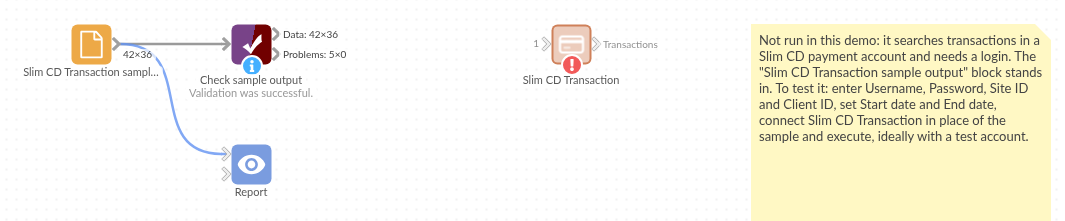
The demo project's workflow: the placeholder data, the block, and a Validate data check on the output.
Language and libraries
Python. It uses requests (Apache License 2.0) and pandas (BSD 3-Clause).
pandas is part of Omniscope's Python environment. requests is listed in the block's dependencies, so Omniscope installs it with pip on first run if it is missing.
Tested
The block is covered by automated tests that run its script against a stand-in for Omniscope's Python API and an invented Slim CD reply (no live calls): the sample transactions and their types, the request sent (only the options that are set), ZIP codes, the all-text option with missing values, a search with no transactions, a single transaction, a refused login, record count only, HTTP and connection errors (the password is not shown), an answer that is not JSON, option checks, and 20,000 transactions.